2025年4月

1.给值:
打开aricle控制器找到addarticle()函数,在合适位置给值,
$data['ownurl'] = getRandChar(16).'.html';
这样添加内容就会自动生成自定义链接了;

2.后台列表预览按钮修改;
打开aricle控制器找到articlelist()函数,给view_url值做个判断,
if($v['ownurl']!=''){
  $v['view_url'] = gourl($v,$v['ownurl']);
}else{
  $v['view_url'] = gourl($v,$v['htmlurl']); 
}
3.同步复杂功能
自定义url是单独存在customurl表里的,所以以上方法添加后复制功能没法用,复制的内容url无法访问,复制文字控制器也要改;
 function copyarticle(){
 $id = $this->frparam('id');
 if($id){
 $data = M('article')->find(['id'=>$id]);
 unset($data['id']);
 $data['ownurl'] = getRandChar(15).'.html';
 $r = M('Article')->add($data);
 
 if($r){
     //查找添加的id
     $res =  M('Article')->find(['ownurl'=>$data['ownurl']]);
     $aid = $res['id'];
     //存入自定义url表
     $tes = M('customurl')->add(['molds'=>'article','url'=>$data['ownurl'],'tid'=>$data['tid'],'addtime'=>time(),'aid'=>$aid]);
 JsonReturn(array('code'=>0,'msg'=>JZLANG('复制成功!')));
 }else{
 JsonReturn(array('code'=>1,'msg'=>JZLANG('复制失败!')));
 }
 }
 }

以下是一个 PHP 网站应用通过微信扫码登录的大致实现步骤:
1、注册微信开放平台账号,并创建网站应用,获取 AppID 和 AppSecret 。
2、配置回调域名:在微信开放平台中设置您网站的合法回调域名。
3、生成微信扫码登录的二维码链接:
<?php
$appid = '您的 AppID';
$redirect_uri = urlencode('您网站的回调地址');
$scope = 'snsapi_login'; 
$state = '自定义的随机字符串'; 
$qr_code_url = "https://open.weixin.qq.com/connect/qrconnect?appid=$appid&redirect_uri=$redirect_uri&response_type=code&scope=$scope&state=$state#wechat_redirect";
header('Location:'.$qr_code_url);
?>
4、用户扫描二维码后,微信会将授权码 code 回调到您设置的回调地址。
5、在回调处理页面中接收授权码并获取 access_token 和 openid :
<?php
if (isset($_GET['code'])) {
    $appid = '您的 AppID';
    $appsecret = '您的 AppSecret';
    $code = $_GET['code'];

    $token_url = "https://api.weixin.qq.com/sns/oauth2/access_token?appid=$appid&secret=$appsecret&code=$code&grant_type=authorization_code";
    $token_response = file_get_contents($token_url);
    $token_data = json_decode($token_response, true);

    if (isset($token_data['access_token']) && isset($token_data['openid'])) {
        // 获取用户信息
        $access_token = $token_data['access_token'];
        $openid = $token_data['openid'];

        $user_info_url = "https://api.weixin.qq.com/sns/userinfo?access_token=$access_token&openid=$openid&lang=zh_CN";
        $user_info_response = file_get_contents($user_info_url);
        $user_info = json_decode($user_info_response, true);

        // 这里进行登录逻辑处理,比如与数据库中的用户数据匹配等
    } else {
        // 处理获取 access_token 失败的情况
    }
}
?>
根据获取到的用户信息进行登录处理,如与数据库中的用户数据进行匹配,完成登录操作。

    function getScheme(){
    $appid = '你的appkey';
    $secret = '你的appsecret';
    $token_url = "https://api.weixin.qq.com/cgi-bin/token?grant_type=client_credential&appid={$appid}&secret={$secret}";
    $token_response = file_get_contents($token_url);
    $token_data = json_decode($token_response, true);
    if (empty($token_data['access_token'])) {
        JsonReturn(['code'=>1,'msg'=>'生成Scheme失败!','data'=>$scheme_result['errmsg']]);
    }
    $access_token = $token_data['access_token'];
    $scheme_data = [
        'jump_wxa' => [
            'path' => '/pages/index/index',//打开页面路径
            'query' => 'from=h5'
        ],
        'expire_type' => 0 //0是1小时有效1永久有效
    ];
    
    $scheme_url = "https://api.weixin.qq.com/wxa/generatescheme?access_token={$access_token}";
    $ch = curl_init($scheme_url);
    curl_setopt($ch, CURLOPT_POST, true);
    curl_setopt($ch, CURLOPT_POSTFIELDS, json_encode($scheme_data));
    curl_setopt($ch, CURLOPT_RETURNTRANSFER, true);
    curl_setopt($ch, CURLOPT_HTTPHEADER, ['Content-Type: application/json']);
    
    $scheme_response = curl_exec($ch);
    curl_close($ch);
    
    $scheme_result = json_decode($scheme_response, true);
    
    if (empty($scheme_result['openlink'])) {
        //die("生成Scheme失败: " . $scheme_result['errmsg']);
        JsonReturn(['code'=>1,'msg'=>'生成Scheme失败!','data'=>$scheme_result['errmsg']]);
    }
     
    JsonReturn(['code'=>0,'msg'=>'获取成功!','data'=>$scheme_result['openlink']]);
   }
function storeDataWithExpiry(data, expiryMinutes) {
    var item = {
        data: data,
        expiry: new Date().getTime() + (expiryMinutes * 60 * 1000)
    };
    localStorage.setItem('myDataWithExpiry', JSON.stringify(item));
}
function getDataWithExpiry() {
    var itemStr = localStorage.getItem('myDataWithExpiry');
    if (!itemStr) {
        return null;
    }
    var item = JSON.parse(itemStr);
    var now = new Date().getTime();
    if (now > item.expiry) {
        localStorage.removeItem('myDataWithExpiry');
        return null;
    }
    return item.data;
}
 
function list(data){
var html='';
data.forEach(function (item,index) {
html+=`<li><a href="mkDetail.html?dpid=${item.deptId}"><h4>${item.deptName}</h4><p><span>${item.cityName?item.cityName:''}</span><span>${item.depttype}</span></p><p>${item.address}</p></a></li>`;
})
if(data.length!=0){$("#lista").html(html);$(".notip").hide();}else{$("#lista").html('');$(".notip").show();}
}

function getDate(){
var md5Hash = $.md5('sign字符串').toUpperCase();
//console.log(md5Hash);  
$.ajax({
 url:"接口地址",
 dataType:"json",
 //data:{deptId:'00001',sign:md5Hash},
 async:true,
 type:"POST",
success:function(r){
   //storeDataWithExpiry(r, 360);
   list(r.result);
   localStorage.setItem('myDataWithExpiry', JSON.stringify(r));
},
 error:function(){
  alert('网络错误~');
}
})
}
getDate();
//数据本地化
var itemStr = localStorage.getItem('myDataWithExpiry');
var jsonData = [];  
if(itemStr){
var mydata= JSON.parse(itemStr);
    jsonData = mydata.result;
}

// 初始化渲染所有数据,jsonData是json数据
  list(jsonData);
//数据筛选
  var currentFilter = {cityName: "all",depttype: "all",mktSize:"all"};
  $(".filter-cityName li").click(function() {
    currentFilter.cityName = $(this).data("value");
    filterData();
  });
  $(".filter-depttype li").click(function() {
    currentFilter.depttype = $(this).data("value");
    filterData();
  });
  $(".filter-mktSize li").click(function() {
    currentFilter.mktSize = $(this).data("value");
    filterData();
  });
  function filterData() {
      var filteredData = jsonData.filter(function(item) {
      var levelMatch = currentFilter.cityName === "all" || item.cityName === currentFilter.cityName;
      var typeMatch = currentFilter.depttype === "all" || item.depttype === currentFilter.depttype;
      var mktMatch = true;
      if (currentFilter.mktSize !== "all") {
        switch(currentFilter.mktSize) {
          case "small":
            mktMatch = item.mktSize >= 1 && item.mktSize <= 49;
            break;
          case "medium":
            mktMatch = item.mktSize >= 50 && item.mktSize <= 99;
            break;
          case "large":
            mktMatch = item.mktSize >= 100;
            break;
        }
      }
      
      return levelMatch && typeMatch && mktMatch;
    });
    list(filteredData);
  }
   
//搜索
$("#searchBtn").on("click", function() {
    performSearch();
  });
$("#deptSearch").on("keypress", function(e) {
  if (e.which === 13) {
    performSearch();
  }
});
function performSearch() {
  var searchTerm = $("#deptSearch").val().trim().toLowerCase();
  if (searchTerm === "") {
    list(jsonData);
    return;
  }
  var filteredData = jsonData.filter(function(item) {
    return item.deptName.toLowerCase().includes(searchTerm);
  });
  list(filteredData);
}
 

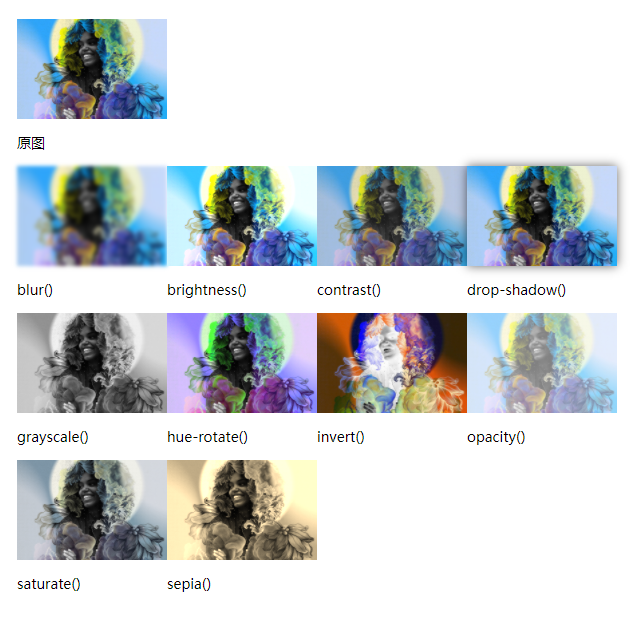
/*filter: none | blur() | brightness() | contrast() | drop-shadow() | grayscale() | hue-rotate() | invert() | opacity() | saturate() | sepia()*/
.ae{filter: blur(2px);transition: .3s;}
/*明度*/
.be{filter: brightness(120%);transition: .3s;}
/*对比度*/
.ce{filter: contrast(80%);transition: .3s;}
/*阴影*/
.de{filter: drop-shadow(0 0 5px rgba(0,0,0,.6));transition: .3s;}
/*灰度*/
.ee{filter:grayscale(100%);transition: .3s;}
/*色相旋转0-360deg*/
.fe{filter: hue-rotate(45deg);transition: .3s;}
/*图形颜色反转*/
.ge{filter: invert(100%);transition: .3s;}
/*透明度,浏览器可提供硬件加速*/
.he{filter: opacity(.5);transition: .3s;}
/*饱和度*/
.ie{filter:saturate(20%);transition: .3s;}
/*转棕色复古*/
.je{filter:sepia(100%);transition: .3s;}

CSS3 filter滤镜大全